The Claude Workflow Map: How to Pick the Right Feature for the Job

Most people use Claude the same way they use a search box.
They open a blank chat, ask a question, copy the answer, and move on.
That is useful, but it misses the bigger opportunity.
Claude is not just a place to ask questions. It is becoming a flexible AI workspace for writing, research, reasoning, coding, file creation, automation, and team workflows. The real advantage comes from knowing which Claude capability to use for the task in front of you.
A quick note before we start: Claude’s features change quickly. Some capabilities depend on your plan, region, workspace settings, browser, device, or organization permissions. For example, Anthropic says Claude in Chrome is currently available in beta for paid Claude plans, while other capabilities such as Projects, Artifacts, Connectors, Skills, and Claude Code each have their own setup rules and availability. Always check your own Claude account and Anthropic’s docs before building a serious workflow around any one feature.
With that said, here is the simplest way to think about Claude:
Do not ask, “What can Claude do?”
Ask, “What kind of work am I trying to complete?”
That one shift changes everything.
Start here: which Claude user are you?
Before choosing a feature, identify the kind of workflow you are trying to build.
1. Solo professionals
Best starting features:
Chat
Projects
Artifacts
File uploads
File creation
Skills
Use Claude to draft, summarize, organize research, build simple tools, create reusable writing systems, and reduce repetitive work.
Good use case:
“Create a Project for my newsletter. Use these past issues as style examples. Help me plan, draft, and refine future editions in the same voice.”
2. Teams
Best starting features:
Projects
Connectors
Skills
Shared workflows
Admin-approved tool access
Teams usually do not need more random prompts. They need consistency. Claude becomes more valuable when it can follow shared instructions, retrieve approved context, and repeat workflows across people.
Anthropic explains that Connectors let Claude access apps and services, retrieve data, and take actions while inheriting the user’s permissions. That matters because teams need both context and control.
Good use case:
“Review the latest project notes, customer feedback, and roadmap docs. Summarize the top three risks for next week’s launch meeting.”
3. Developers
Best starting features:
Claude Code
API
Projects
Extended Thinking
Connectors
Developers should think beyond “write me code.” Anthropic describes Claude Code as an agentic coding tool that reads a codebase, edits files, runs commands, and integrates with development tools.
Good use case:
“Review the authentication flow, identify security gaps, write tests for the risky paths, patch the issue, and explain what changed.”
4. Operators and assistants
Best starting features:
Claude in Chrome
Cowork
File creation
Connectors
Projects
Skills
Operators need Claude to help complete work across files, websites, spreadsheets, reports, and repeatable processes.
Good use case:
“Review the client brief and meeting notes. Create a project timeline, draft a kickoff agenda, and list the missing information we need before work begins.”
The Claude feature decision table
Use this table when you are unsure where to start.
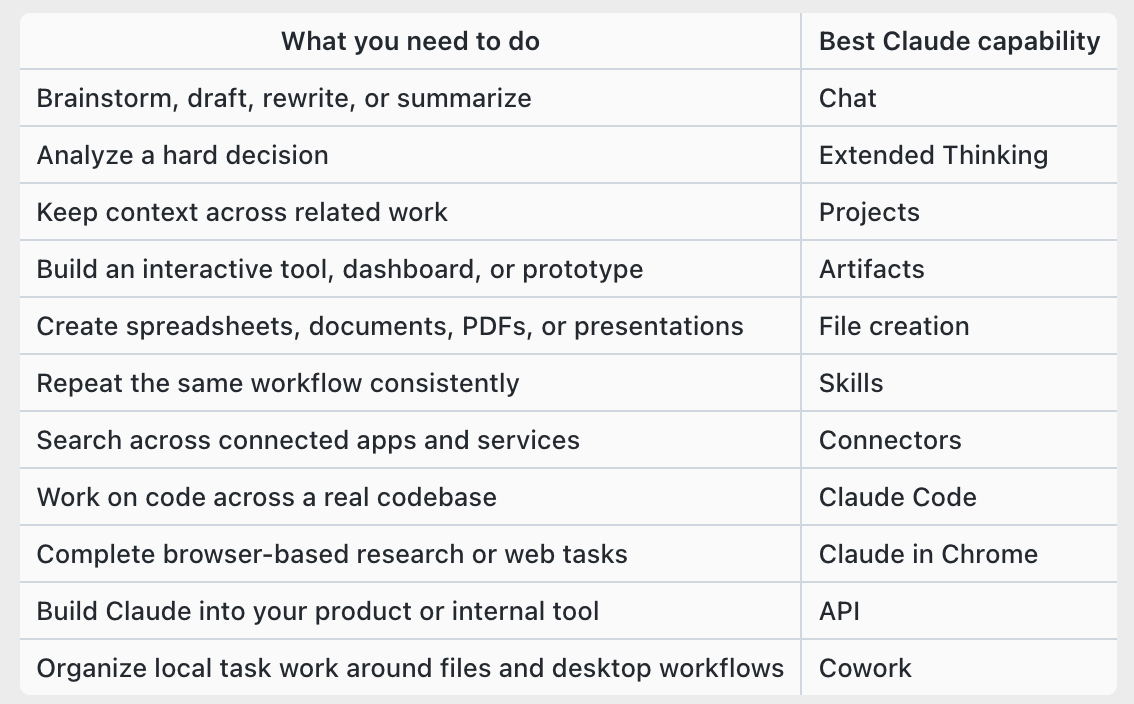
The goal is not to use every feature every day. The goal is to match the task to the right workspace.
1. Chat: use it for messy thinking, not just polished questions
Chat is still the easiest place to begin.
Use it for brainstorming, drafting, rewriting, summarizing, role-playing conversations, simplifying ideas, or turning rough notes into something usable.
A weak prompt sounds like this:
“Write me a sales email.”
A stronger prompt sounds like this:
“I’m pitching a mid-market SaaS company tomorrow. They care about reducing support costs without hurting customer experience. Give me three opening angles, one sharp discovery question, and a follow-up email I can send after the meeting.”
The difference is context.
Claude is much more useful when it knows the audience, goal, constraints, and situation.
2. Extended Thinking: use it when the answer needs judgment
Some tasks should not be answered quickly.
Pricing strategy, hiring decisions, customer churn analysis, technical architecture, positioning, and risk assessment all require trade-offs.
Anthropic says Extended Thinking lets Claude spend more time breaking down problems, planning solutions, and exploring different approaches before responding.
Use it when you want Claude to reason through options, not just produce an answer.
Try this:
“I’m deciding whether to raise prices by 20 percent or launch a lower-cost tier. Analyze the trade-offs for revenue, churn, customer perception, and sales positioning. Give me a recommendation, but also tell me what could make your recommendation wrong.”
A strong strategic answer should not only tell you what to do. It should show the assumptions behind the recommendation.
3. Projects: use them when context should persist
Projects are one of Claude’s most important workflow features.
Anthropic describes Projects as self-contained workspaces with their own chat histories and knowledge bases. Inside a Project, you can upload documents, provide context, and keep related work organized.
Use Projects for:
A client account
A product launch
A recurring newsletter
A brand voice system
A research project
A course curriculum
A hiring process
A legal or compliance review
Prompt example:
“I’m adding this client’s brand guidelines, past campaigns, offer details, and audience research to this Project. From now on, use this context whenever we create content for them.”
The value of Projects is simple: you stop re-explaining the same background every time.
4. Artifacts: use Claude to build usable outputs
Artifacts help Claude move beyond text.
Anthropic says Artifacts let users create and work with standalone content such as apps, tools, visualizations, and other shareable outputs.
Use Artifacts when you want Claude to create something you can interact with, edit, reuse, or share.
Good Artifact requests include:
A campaign calendar
A project tracker
A simple calculator
A dashboard mockup
A landing page wireframe
A comparison tool
A content planning board
A lightweight interactive prototype
Prompt example:
“Build me an editable weekly content calendar with columns for topic, audience, format, platform, status, owner, publish date, and repurposing notes.”
The key is to ask for an object, not just advice.
Instead of:
“Give me ideas for a dashboard.”
Try:
“Create a dashboard mockup that tracks weekly leads, conversion rate, sales calls booked, proposal value, and closed revenue.”
5. File creation: use Claude for documents, spreadsheets, reports, and decks
Claude can create practical files, not just text responses.
Anthropic says Claude can create Excel spreadsheets, PowerPoint presentations, Word documents, and PDF files, depending on the feature and account setup.
This is especially useful for founders, consultants, educators, marketers, analysts, and operators who need polished deliverables.
Instead of asking:
“Give me a project plan.”
Ask:
“Create a project timeline spreadsheet with milestones, owners, deadlines, dependencies, and status. Add formulas for days remaining and flag overdue items.”
Useful file requests include:
Client reports
Budget trackers
Course outlines
Workshop handouts
Content calendars
Pitch decks
Meeting agendas
Project timelines
Research summaries
Practical tip: ask Claude to outline the structure before creating the file. That gives you a chance to fix the logic before it becomes a deliverable.
6. Skills: use them to make good work repeatable
Prompts are useful once.
Skills are useful repeatedly.
Anthropic describes Skills as folders of instructions, scripts, and resources that Claude can use for specialized tasks. They are designed for recurring workflows where you want Claude to follow the same rules each time.
Use Skills for:
Writing in a brand voice
Producing client reports
Reviewing contracts
Formatting newsletters
Analyzing sales calls
Building pitch decks
Creating lesson plans
Running weekly business reviews
A simple Skill might include:
Tone rules
Formatting rules
Good examples
Bad examples
Workflow steps
Required checks
Banned phrases
Output templates
Anthropic recommends that custom skills should solve a specific, repeatable task and stay focused on one workflow. That is important. A focused Skill is easier to test, trust, and improve.
Memory hook:
Prompts tell Claude what to do now. Skills tell Claude how to do a repeatable job.
7. Connectors: use Claude across your actual work tools
Many weak AI answers are not caused by weak models. They are caused by missing context.
Connectors help close that gap.
Anthropic explains that Connectors let Claude access apps and services, retrieve data, and take actions within connected services.
That can make Claude far more useful in real business workflows.
Instead of asking:
“What should I say to this client?”
You can ask:
“Review the latest client emails, the proposal, and the meeting notes. Draft a reply that addresses their concerns and keeps the project moving.”
Use Connectors when Claude needs context from:
Email
Calendar
Drive
Slack
Notion
Project management tools
Internal docs
Customer records
Knowledge bases
Before connecting tools, ask three questions:
What data can Claude see?
What actions can Claude take?
What should always require human approval?
Better context creates better work, but access should always be intentional.
8. Claude in Chrome: use it when the work happens on the web
Claude in Chrome is built for browser-based work.
Anthropic says Claude in Chrome can interact directly with websites on your behalf. That can be powerful for research and task completion, but it also creates safety considerations.
Use it for:
Competitor research
Product comparisons
Web app testing
Review analysis
Market research
Extracting information from public pages
Completing low-risk repetitive web tasks
Prompt example:
“Research five competitors in the AI writing space. Summarize their pricing, main features, positioning, and recurring customer complaints from review pages.”
Important boundary: be careful with financial accounts, legal filings, purchases, sensitive customer data, or irreversible actions. Keep approval steps in place.
9. Claude Code: use it as a coding collaborator
Claude Code is built for real software work.
According to Anthropic, Claude Code can read your codebase, edit files, run commands, and work across development tools.
That makes it more useful than a basic code generator.
Use Claude Code for:
Fixing bugs
Writing tests
Explaining unfamiliar code
Refactoring modules
Investigating build failures
Improving security
Adding features
Updating documentation
A stronger coding prompt looks like this:
“Review the payment flow. Find edge cases that could cause failed subscriptions, write tests for them, patch the issue, and explain the changes.”
Best practice: ask for a plan first, then review the diff. Treat Claude Code like a fast collaborator whose work still deserves human review.
10. API: use Claude when the workflow needs to scale
The Claude API is for teams that want Claude inside their own tools, products, or internal systems.
Anthropic’s developer docs describe Claude as a platform for tasks involving language, reasoning, analysis, coding, and more.
Use the API when a workflow is valuable enough to repeat automatically.
Examples:
A support assistant that drafts replies from help docs
A research tool that extracts insights from long documents
A sales assistant that summarizes CRM notes before calls
A compliance tool that flags risky language before publishing
An internal knowledge assistant that answers employee questions
Use Claude.ai when a human is directly collaborating. Use the API when Claude needs to become part of a system.
The missing piece: what “context” really means
People often say, “Give Claude more context.”
That is true, but vague.
Here are five types of context that improve Claude’s work.
1. Business context
This includes your goals, customers, offers, pricing, positioning, competitors, and constraints.
Example:
“Our audience is HR leaders at companies with 500 to 5,000 employees. They care about retention, manager training, and reducing burnout.”
2. Voice context
This includes tone, style, examples, banned phrases, and preferred structure.
Example:
“Write in a clear, direct, professional tone. Avoid hype. Use short paragraphs. Do not use clichés.”
3. Workflow context
This includes the steps you follow, the order of operations, approval rules, templates, and handoffs.
Example:
“For each newsletter, first identify the central idea, then outline the sections, then draft, then create five subject lines, then produce a LinkedIn summary.”
4. Decision context
This includes trade-offs, risks, assumptions, budget, time constraints, and success criteria.
Example:
“We care more about reducing churn than maximizing short-term revenue. We have a six-week implementation window.”
5. Source context
This includes files, emails, notes, transcripts, docs, spreadsheets, and meeting summaries.
Example:
“Use the attached customer interviews, product roadmap, and sales call notes as the source material. Do not invent customer pain points.”
The better the context, the less Claude has to guess.
A practical 7-day plan to become better with Claude
You do not need to master every feature at once.
Try this simple seven-day adoption plan.
Day 1: Improve one daily Chat workflow
Pick one recurring task you already do, such as writing emails, summarizing notes, or brainstorming content.
Ask Claude to help you improve it.
Goal: learn how much better outputs get when you provide audience, goal, tone, and constraints.
Day 2: Create one Project
Choose a real area of work, such as a client, product, newsletter, course, or internal process.
Add relevant context and instructions.
Goal: stop starting from zero in every chat.
Day 3: Upload useful source files
Add brand guidelines, meeting notes, research docs, transcripts, or examples of past work.
Ask Claude to summarize the patterns it notices.
Goal: turn scattered information into a usable knowledge base.
Day 4: Build one Artifact
Ask Claude to create a tracker, calendar, dashboard, calculator, or simple interactive tool.
Goal: move from text answers to practical outputs.
Day 5: Create one reusable Skill
Choose a repeatable workflow and turn it into instructions.
Start small.
Example:
“Create a Skill for drafting newsletter outlines in my preferred format.”
Goal: make good work repeatable.
Day 6: Connect one trusted tool
Start with one tool that gives Claude useful context, such as Drive, Notion, Slack, Gmail, or Calendar, depending on what your account supports.
Goal: test whether connected context improves the quality of Claude’s answers.
Day 7: Document one complete workflow
Write down the full process:
Inputs
Claude feature used
Prompt
Review step
Output
Human approval point
Next action
Goal: turn Claude from a random assistant into a reliable workflow partner.
A simple Claude workflow example
Imagine you run a small consulting business and need to prepare for a client strategy meeting.
Here is how you might use Claude as a workflow:
Use Projects to store the client’s background, goals, past proposals, and meeting notes.
Use Connectors to retrieve the latest relevant documents or messages.
Use Extended Thinking to analyze the client’s risks, opportunities, and possible objections.
Use Chat to brainstorm meeting angles and discovery questions.
Use Artifacts to create a project roadmap or decision dashboard.
Use file creation to produce a polished meeting brief or slide deck.
Use Skills to save the process so every client prep follows the same structure.
That is the real shift.
Claude becomes much more useful when features work together.
What not to automate too quickly
Claude can help with a lot, but not everything should be automated immediately.
Be careful with:
Legal decisions
Medical decisions
Financial decisions
Sensitive client data
Hiring or firing decisions
Security-critical code
Irreversible website actions
Customer-facing messages with compliance risk
Use Claude to draft, analyze, summarize, compare, and prepare.
Keep humans responsible for judgment, approval, and accountability.
Move from prompting to workflow design
The next stage of AI productivity is not about collecting clever prompts.
It is about designing better workflows.
Claude becomes more valuable when you give it the right context, choose the right feature, reuse what works, and keep humans in the loop where judgment matters.
Start small.
Pick one recurring task. Add context. Choose the right Claude capability. Save the workflow. Improve it next week.
That is how AI work compounds.
So here is the real question: which part of your work is still trapped in one-off prompting when it should already be a reusable AI workflow?